REALFAT32 / WINDOWS
Want to easily format your external drives as FAT32?
Connect your drive, select it and get it ready. A small, portable, open-source app. No complicated setup.
- Free
- Open source
- No ads
THAT SIMPLE
FAT32, with everything in view.
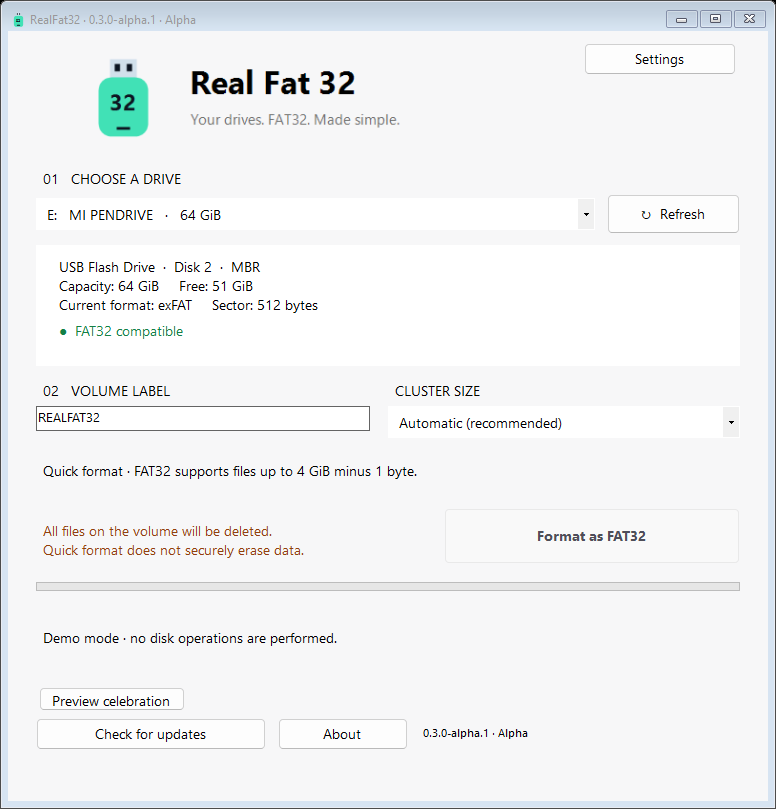
Prepare compatible USB drives, memory cards and external drives as FAT32, including volumes larger than 32 GB. All in one window.
- Find your drive.Check its capacity and format. Refresh the list when you connect a device.
- Select and confirm.Review the target and confirm the format after a three-second countdown.
- Ready to use.Quick formatting, system disk protection, language options and an optional night mode.
FAT32 supports files up to 4 GiB minus 1 byte.
START HERE
One drive. One format. Ready.
Download RealFat32 and run it on Windows. You choose the drive and confirm every format.
0.3.0-alpha.1AlphaWindows 10 / 11 · x64
Alpha version: use a test drive first. Formatting deletes the files on the selected drive. Back up your data before continuing.